Free playbook + AI prompt
Restaurant
Health
Report
Where should your restaurant start? Copy one prompt into any AI and find out, free.
Most owners watch one number: the card rate. This free prompt has your AI look at the rest. How your reviews compare with the restaurants around you, what card fees and delivery apps really cost at your ticket sizes, which listings went wrong, and whether to start with your processor, a kiosk, your reputation or your delivery apps.
Your restaurant
Start here: the AI looks this restaurant up.
By Truvana Tech · built from conversations with 6,000+ merchants

Chapter no. 1
Why we built it
Truvana Tech reached out to more than 6,000 merchants. We spent those conversations listening as much as talking: how owners run the business, what they watch, what worries them, and what they would change first.
The pattern was hard to miss. Most owners watched one number, the card rate on their contract, and little else. Few were getting the most from their marketing. Almost none could say whether their reviews were good or bad next to the restaurants around them. And nearly everyone asked the same question: where do we even start?
We had tested many payment solutions side by side, so we knew which numbers actually move a restaurant's margin. This playbook is that analysis, written down as one prompt that any owner, consultant or ISO can paste into an AI.
6,000+
merchants Truvana Tech reached out to before writing a single line of this check-up.
Chapter no. 2
What owners told us
“We only look at our card rate.”
“Are our reviews good or bad?”
“Where do we even start?”
Paraphrased from what owners told us most often.
Chapter no. 3
What the check-up looks at
Most owners have never seen these four things side by side. The report gives each one a page, using only public information.
01
You vs. the restaurants nearby
Your Google rating and review count, ranked against 3–5 nearby restaurants of the same kind. A rating only means something next to the neighbors.
02
Your real card rate at your real tickets
Card fees are a percentage plus a few cents per sale. On small tickets, those cents add up faster than the percentage.
03
What the delivery apps keep
The same items priced direct vs. on the apps. Mark a $10.00 item up 50¢ and a 30% commission still takes $3.15 of it.
04
Listing mistakes you can fix for free
Your website, Google, Yelp, Apple Maps and each delivery app keep their own copy of your phone number and hours. The report finds the ones that drifted.
6.35%
in card fees on a $4.00 sale at a common 2.6% + 15¢. The same rate costs 2.98% on a $40.00 sale.

Chapter no. 4
Where to start
The last page answers the question owners actually ask. Each answer is rated only as far as the public evidence goes, and "not enough data" is an answer too: it tells you what to measure next.
Should I switch card processors or pricing?
Small tickets where the per-sale cents dominate, a missing or confusing card-fee policy, and what your state allows.
Would a self-order kiosk save labor?
Reviews about lines, waits or wrong orders, and a busy counter-service menu.
Do I need help with reviews and reputation?
A rating below the nearby average, far fewer reviews than your rivals, recurring complaints, and listing mistakes.
Can I cut delivery-app costs?
App prices close to your own, high-priced items with no markup, and whether guests can order direct.
Chapter no. 5
Inside the report
This is what a full check-up covers, built only from public sources. Click through a sample made with the open-source skill.
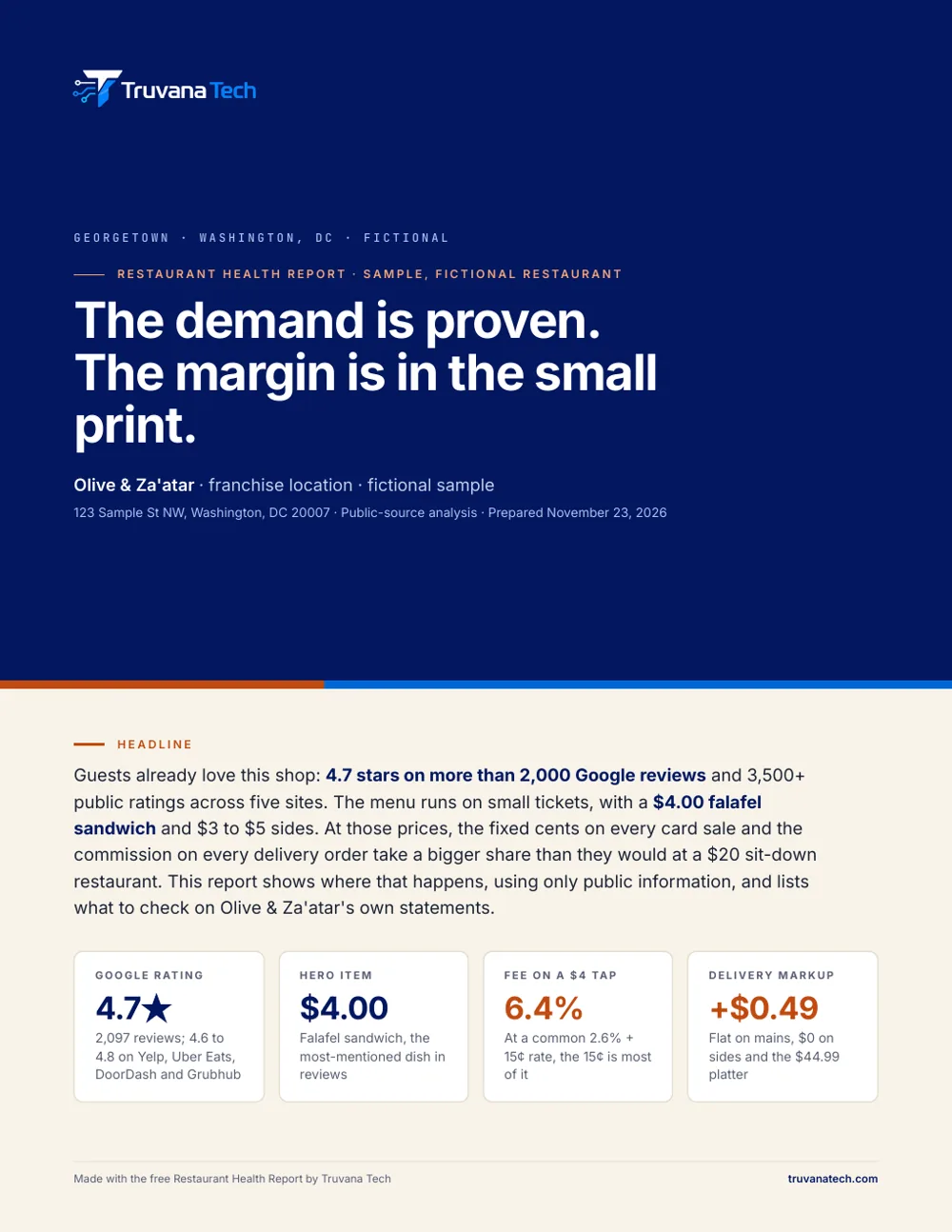
The restaurant in the sample is fictional. Real reports only use facts found on public pages, each with a link.
Chapter no. 6
Use it in any AI
Three steps, no setup. It works in the AI you already use, on a phone or a computer.
01
Copy the prompt
Use the button at the top of this page. Add your restaurant's name and address first, or let the AI ask you. Rather not do it yourself? Leave your email and we'll send you the report.
02
Paste it into your AI
ChatGPT, Claude, Gemini, DeepSeek, Kimi or any AI with web search. Turn web search on if your AI asks.
03
Read it, then double-check
Start with the free fixes. Check anything marked "To verify" yourself, and compare the card-fee example with one month of your own statement.
Tips for owners
- Start with the free fixes: they cost nothing and you can do them this week.
- "Verified" means the AI saw it on a public page. "To verify" means check it yourself.
- On the last part, start with the question marked "Strong signal".
Tips for ISOs and agents
- Run it before a first visit, so you walk in with something true about the merchant's own store.
- Check every "To verify" item before the meeting. Never present a guess as a fact.
- Open with the free fixes. They show the work before you ask for anything.
Developers: the full open-source skill for Claude Code and Codex makes a branded 7-page PDF →
Chapter no. 7
The AI you already use
The prompt works in the AI you already use. Any assistant that can search the web can run the check-up.
Results depend on each AI's web search. Names and logos are trademarks of their owners; no endorsement is implied.
Reads public data from
A check-up, not a full service
Want a deeper look?
The report is a quick check-up from public information. For a deeper look, our team is happy to meet with you, walk through your restaurant together, and suggest what to improve first, in English or Spanish.
What is a restaurant health report?
A quick check-up of how a restaurant looks from the outside: its reviews compared with nearby restaurants, what card fees cost at its real ticket sizes, how delivery-app prices compare with its own ordering, listing mistakes to fix, and where to start. Truvana Tech's free AI skill builds one from public sources in about 30 minutes.
Is it a full analysis of my restaurant?
No. It's a quick check-up from public information, and it says so. It can't see your statements, sales or staffing. For a deeper look, Truvana Tech's team will meet with you, walk through your restaurant and suggest what to improve first.
Can ISOs, agents and consultants use it?
Yes. The skill is open source under the MIT license, so anyone can run it on any restaurant. Reports are written for the owner, mark every fact as verified or not, and keep Truvana Tech's name and links.
Do I need to be technical to run it?
No. You need Claude Code or Codex, Python 3 and Google Chrome. Paste one line to install it, then ask for a report by the restaurant's name. The report is a PDF you can print or share.